Manage Patient Forms
|
Forms are used in axiUm to record patient information and they are attached to a patient’s record. You can access and use forms in many axiUm modules to capture patient information. Examples: The EHR, Perio Chart, Ortho Manager, Personal Planner, and Attachments/Consents modules. Note: This section walks you through only the basics of using forms in axiUm.  Add Patient Forms Add Patient Forms
When necessary, you can add patient forms from the Attachments/Consents module. Tip: Forms can be added to a patient in several places throughout axiUm. While the EHR is the most common area to add a form, there will be times when it is easier to add forms from another module. To add a patient form:
The form is added to the patient’s file and displays. Manage Patient Forms
The activities you can perform with forms vary based on which module you use to access forms. This section covers the tasks you can perform from the Attachments/Consents module.
Tip: If necessary, select the Show Deleted checkbox to include all deleted forms.
View Forms
Tip: You can also double-click a form. View Form History
Modify Form Date/Description
Suspend Forms
Unsuspend Forms
Delete Forms
Important: A deleted form cannot be viewed, as it is completely removed from the database. Preview/Print Forms
The file displays/prints. Print Forms List
A list of all the forms within the Section and Sub-tab prints. Approve Forms
All forms that are completed by a provider or a patient must be approved from the EHR module > Forms tab. |
 ) icon to display the Add Form window.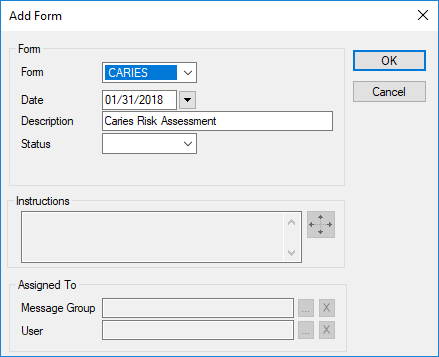
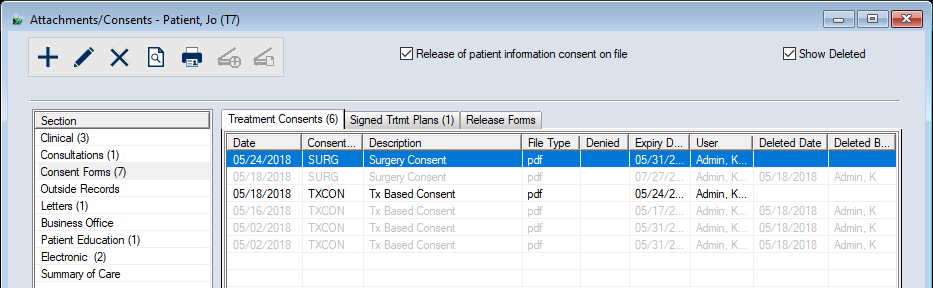
 ).
). ) icon to display the Suspend Form window.
 ) icon.
 ) icon.
 ) icon.
 ) icon.